Locator Bar Heads
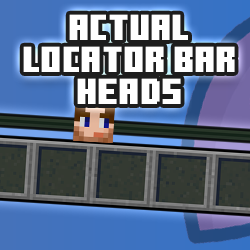
The locator bar tells you someone is over there. This tells you who. Swap the coloured dots for your friends' actual faces, straight from their skins.

Add players below and they'll appear on the bar. Heads shrink with distance.
That's a Player Heads pack
It can't be updated here, but it has a list of players we can use. Import them and we'll render a locator bar head for each one.
Rendering heads…
0 of 0
Import complete
Build your pack
Gamertags in, heads on the bar
Start fresh, or bring back a pack you've already made.
Upload an existing .mcaddon to add or remove players
Got a Player Heads pack? Drop it here to import its players. Or start fresh by adding gamertags below.
Reading pack...
64×64 PNG skin file, for players the render service can't find. The name must match their in-game name (case doesn't matter).
Your pack is built in your browser. Only gamertags are sent, to minecraftrender.com, to draw each head.
No players added yet
Enter a gamertag above to get started
How it works
Three steps. No file surgery required.
Add your players
Type in each player's Xbox gamertag. We render their head from their current skin or Character Creator persona. Add as many as you like, your whole realm if you want. Hit download and we package it into a ready-to-go .mcaddon, right here in your browser.
Install it
Open the .mcaddon and Minecraft imports it. Create or edit a world, go to Behavior Packs and activate it. The Resource Pack comes along automatically because the two are linked. Needs Minecraft Bedrock 1.26.40 or newer. Runs on the stable Script API, so no experimental toggles. Works on Realms too: add both packs to the realm's world.
Look up
The pack switches off the vanilla player dots and puts a head on the bar for every player online. Anyone in the pack shows their own face; anyone else shows the fallback you picked. Heads shrink as players get further away, just like the vanilla dots fade.
Everything happens on the world host, so only the person hosting (or the realm) needs the pack. Everyone who joins sees the heads, and anyone who'd rather not can run /phlb:heads dots or /phlb:heads off to change what their own bar shows (no cheats required).
Can't find a player?
Heads are rendered by minecraftrender.com from the player's gamertag. If a player can't be found, point them at BedrockGo.com: one quick join to the hub and they'll resolve. Or upload their skin file using the option above; any 64×64 skin PNG works.
The name must match the player's in-game name (case doesn't matter) or their head won't be picked up when they join.
Already got a pack?
Upload your existing .mcaddon at the top of the page. We'll pull out everyone in it, let you add or remove players, refresh anyone's head from their current skin (or all of them at once), and repackage it with a bumped version number. Same UUIDs means Minecraft treats it as an update, so there's no need to remove the old pack first.
Already built a pack with our Player Heads generator? Upload that instead and we'll import its player list, so you don't have to type everyone in again.